Basic Settings
The Basic Settings panel in the OfficeHub theme allows you to configure global design, layout, and functionality options that apply across your entire store. All changes are made directly in the Theme Editor under Theme Settings.
📐 1. Layout / Root
Controls the foundational layout and typography scale.
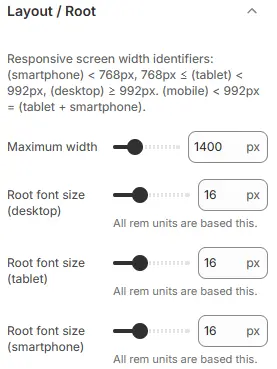
- Maximum page width: Sets the max width (in pixels) of the responsive container. Content will center and stop expanding beyond this width on large screens.
- Root font size (desktop): Base font size for desktop (e.g.,
16px). Allrem-based or percentage-based sizing in sections/blocks is calculated relative to this value. - Root font size (mobile): Base font size for mobile devices.
✅ Example: If root font size =
16px, then1.25rem=16px × 1.25=20px.
🖼️ 2. Logo
Upload your store’s logo for use in the header and footer.

- Logo (dark): Primary logo (for light or neutral backgrounds).
- Logo (light): Alternate logo (for transparent or dark headers).
✅ Best Practice: Use SVG format for crisp, scalable rendering on all devices. Avoid raster formats (JPG/PNG) unless necessary.
🌐 3. Favicon
Sets the browser tab icon.

- Image: Upload a 180×180px PNG file for best compatibility across devices (including Apple Touch Icons).
🎨 4. Colors
Define your store’s global color palette.
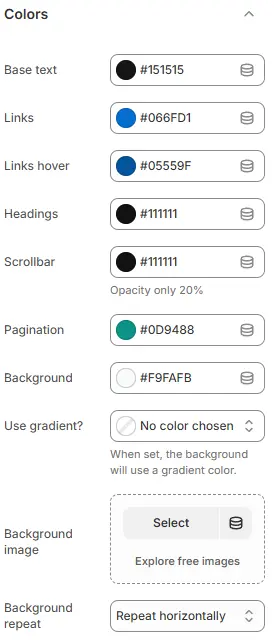
- Base text: The default color for all body text across your store.
- Links: The color of clickable text links.
- Links hover: The color applied to links when a user hovers over them.
- Headings: The text color for all heading elements (
<h1>through<h6>). - Scrollbar: The color of the browser’s scrollbar (where supported).
- Pagination: The color of pagination buttons (e.g., “Previous,” “Next,” page numbers).
- Background: The background color of the entire page (
<body>). - Use gradient?: Toggle to apply a gradient overlay on top of the background color.
- Background image: Upload an image to use as the page background.
- Background repeat: Control how the background image repeats—options include repeat, no-repeat, repeat-x, or repeat-y.
🌫️ Overlays

- Backdrop background: The background color of modal or popup backdrops (e.g., when opening a cart or lightbox).
- Backdrop blur: Applies a Gaussian blur effect to the content behind the overlay for depth and focus enhancement.
0 px= no blur- Higher values = stronger blur (may impact performance on low-end devices)
🎨 Color Variables
A comprehensive set of predefined color variables used throughout sections and blocks:
primary, secondary, success, info, warning, danger, light, dark, muted, blue, azure, indigo, purple, pink, red, orange, yellow, lime, green, teal, cyan, x, facebook, twitter, linkedin, google, youtube, vimeo, dribbble, github, instagram, pinterest, vk, rss, flickr, bitbucket, tabler, custom-color-1, custom-color-2, white, black, gray-950, gray-900, gray-800, gray-700, gray-600, gray-500, gray-400, gray-300, gray-200, gray-100, gray-50

- Darken ratio: Applies a darken effect to generate hover states (e.g.,
primary-darkenfor button hovers). - Lighten ratio: Applies a lighten effect for subtle backgrounds (e.g.,
primary-ltfor badges).
⚠️ Note: Grayscale colors (
white,black,gray-*) are not affected by darken/lighten ratios.
🔤 5. Typography
Customize fonts and text sizing.
🔤 Font Selection

- Headings: Sets the font family for all heading elements (
<h1>–<h6>). - Capitalize headings: Toggle title-case for all headings
- Heading letter spacing: Adjusts the spacing between characters in headings (CSS:
letter-spacing).- Negative values = tighter spacing
- Positive values = looser spacing
- Body text: Sets the font family for main body/content text (paragraphs, lists, etc.).
- Buttons: Sets the font family for button labels and call-to-action elements.
- Bold mobile navigation: When enabled, applies bold weight to mobile navigation menu items (CSS:
font-weight: 700or theme-defined bold). - Store name: Sets the font family for the store name display (typically in header/logo area).
⚠️ Note:If not using a logo image – this font will be used as fallback typography for branding.
📏 Font Size Variables
All sizes are relative to the root font size (see Section 1).
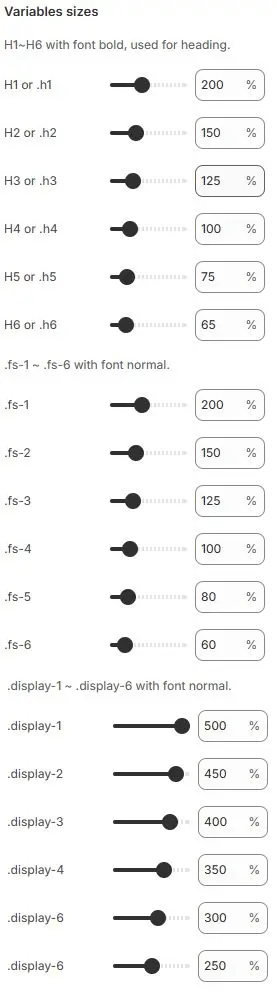
.h1–.h6: Bold heading sizes (for<h1>–<h6>or utility classes).fs-1–.fs-6: Regular-weight text sizes (for body content).display-1–.display-6: Large display text (for hero sections, banners)
🛒 6. Cart
Configure cart behavior and appearance.

- Cart type: Choose between
sidebarorpage - After adding to cart:
- Show cart sidebar (requires sidebar cart)
- Show notification (popover near cart icon)
- Go to cart page (with quantity check)
- Go to cart page (JS disabled)
- Show variant detail for single variant products: Toggle display of variant info (e.g., color/size) even when only one variant exists
Free Shipping Bar
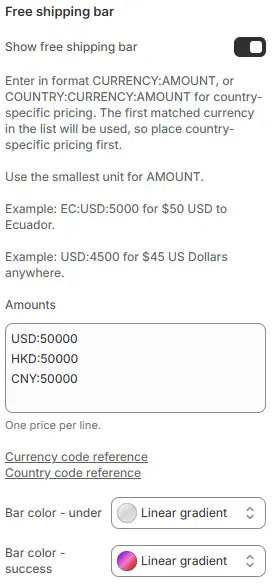
- Show free shipping bar: Enable progress bar toward free shipping
- Amounts: Define thresholds using smallest currency unit
Example:USD:5000= $50.00 USD
Example:EC:USD:4500= $45.00 USD for EcuadorUSD:50000 - Bar color - under: Progress bar color before threshold
- Bar color - success: Bar color after threshold is met
💰 7. Currency Format

- Show currency codes on product prices: e.g.,
$19.99 USD - Show currency codes on totals: e.g.,
Subtotal: $59.97 USD
📌 Note: Codes do not appear on itemized, unit, or installment prices.
8. 🧩 Filters
When filters allow the display of vendor or brand, the following settings can be used to configure the icon.
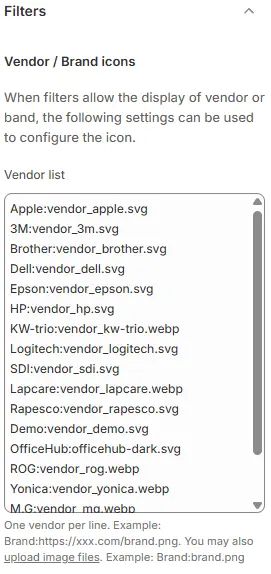
- Vendor list: Brand icon list, format:
BrandName:file pathApple:vendor_apple.svg
3M:vendor_3m.svg
Brother:vendor_brother.svg
Dell:vendor_dell.svg
Epson:vendor_epson.svg
HP:vendor_hp.svg
KW-trio:vendor_kw-trio.webp
Logitech:vendor_logitech.svg
SDI:vendor_sdi.svg
ROG:https://cdn.shopify.com/s/files/1/0998/5864/5268/files/vendor_rog.webp.webp⚠️ Important:
- Filenames must match exactly (case-sensitive on some servers).
- If a brand has no matching icon file, it may fall back to text-only or default placeholder.
- For optimal performance and scalability, prefer SVG format for vector logos.
- WebP is supported for modern browsers; provide fallbacks if needed.
📱 9. Social Media
Add links to your social profiles. Supported platforms:
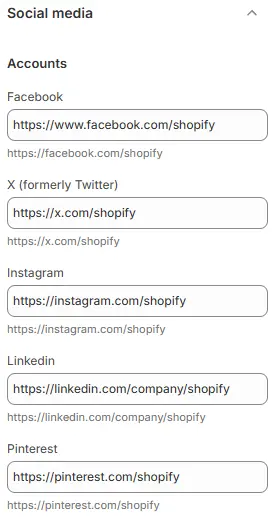
- Facebook, X (Twitter), Instagram, LinkedIn, Pinterest, TikTok, WhatsApp
- YouTube, Vimeo, Tumblr, Twitch, Threads, Discord, Mastodon, Snapchat, Spotify, WeChat
You can also add one custom social link with a custom icon.

10. 🔍 Search
Automatically recommend keywords based on input characters.

- Enable predictive search: When enabled, the search bar will automatically recommend keywords or popular queries as the user types, based on input characters.
🌍 11. Translation
Choose how your store handles multi-language support.
🌐 Translate Method

- Shopify: Uses Shopify’s native translation system (manage via Settings > Languages in admin)
- Microsoft: Uses Microsoft Translator API via
translate.js - Google: Loads Google Translate widget from
translate.google.com
🟦 Microsoft Translate Settings
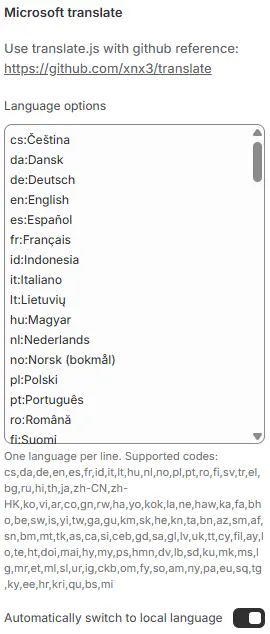
- Language options: Enter one per line as
code:Name
Example:zh-CN:中文(简体)
Supports 60+ languages (see full list in theme documentation)cs:Čeština
da:Dansk
de:Deutsch
en:English
es:Español
fr:Français
id:Indonesia
it:Italiano
lt:Lietuvių
hu:Magyar
nl:Nederlands
no:Norsk (bokmål)
pl:Polski
pt:Português
ro:Română
fi:Suomi
sv:Svenska
tr:Türkçe
el:Ελληνικά
bg:Български
ru:Русский
hi:हिन्दी (बीटा)
th:ภาษาไทย
ja:日本語
zh-CN:简体中文
zh-HK:繁體中文
ko:한국어
vi:tiếng Việt
ar:عربي
co:Corsu
gn:guarani
rw:kinyarwanda
ha:Hausa
yo:Yoruba
kok:Konkani
la:Latinum
ne:नेपाली
haw:ʻŌlelo Hawaiʻi
ka:ქართული
fa:فارسی
bho:भोजपुरी
be:беларус
sw:kiswahili
is:íslenska
yi:ייִדיש
tw:Twi
ga:Éireannach
gu:ગુજરાતી
km:ខ្មែរ
sk:slovenský
he:עִברִית
kn:ಕನ್ನಡ
ta:தமிழ்
bn:বাংলা
az:azərbaycanlı
sm:samoa
af:afrikaans
sn:shona
bm:Bamanankan
mt:Malti
tk:türkmen
as:অসমীয়া
ca:català
si:singapore
ceb:Cebuano
gd:Gàidhlig
sa:संस्कृत
gl:gallego
lv:latviešu
uk:український
tt:татар
cy:Cymry
fil:pilipino
ay:Aymara
lo:ລາວ
te:తెలుగు
ht:Kreyòl ayisyen
doi:डोगरी
mai:मैथिली
hy:հայ
my:မြန်မာ
ps:پښتو
hmn:hmoob
dv:ދިވެހި
lb:lëtzebuergesch
sd:سنڌي
ku:Kurdî
mk:македонски
ms:melayu
lg:Oluganda
mr:मराठी
et:eesti keel
ml:മലയാളം
sl:slovenščina
ur:اردو
ig:igbo
ckb:کوردی سۆرانی
om:Afaan Oromoo
fy:Fries
so:somaliyeed
am:አማርኛ
ny:Chicheŵa
pa:ਪੰਜਾਬੀ
eu:euskera
sq:shqip
tg:тоҷикӣ
ky:Кыргызча
ee:Eʋegbe
hr:hrvatski
kri:kreyòl
qu:Runasimi
bs:Bosanski
mi:Maori - Automatically switch to local language: Auto-detect browser language on load
🟨 Google Translate Settings
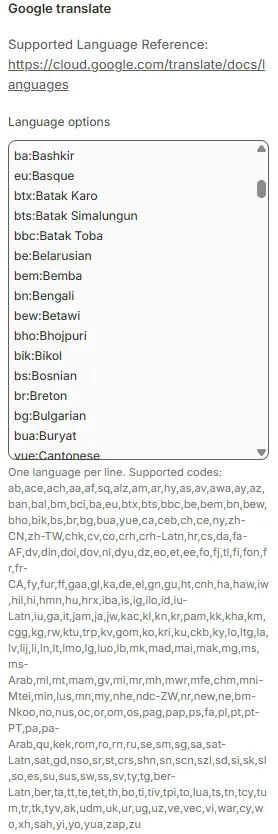
- Language options: Same format (
code:Name)
Supports 100+ languages (including regional variants)en:English
ab:Abkhaz
ace:Acehnese
ach:Acholi
aa:Afar
af:Afrikaans
sq:Albanian
alz:Alur
am:Amharic
ar:Arabic
hy:Armenian
as:Assamese
av:Avar
awa:Awadhi
ay:Aymara
az:Azerbaijani
ban:Balinese
bal:Baluchi
bm:Bambara
bci:Baoulé
ba:Bashkir
eu:Basque
btx:Batak Karo
bts:Batak Simalungun
bbc:Batak Toba
be:Belarusian
bem:Bemba
bn:Bengali
bew:Betawi
bho:Bhojpuri
bik:Bikol
bs:Bosnian
br:Breton
bg:Bulgarian
bua:Buryat
yue:Cantonese
ca:Catalan
ceb:Cebuano
ch:Chamorro
ce:Chechen
ny:Chichewa
zh-CN:Chinese (Simplified)
zh-TW:Chinese (Traditional)
chk:Chuukese
cv:Chuvash
co:Corsican
crh:Crimean Tatar (Cyrillic)
crh-Latn:Crimean Tatar (Latin)
hr:Croatian
cs:Czech
da:Danish
fa-AF:Dari
dv:Dhivehi
din:Dinka
doi:Dogri
dov:Dombe
nl:Dutch
dyu:Dyula
dz:Dzongkha
eo:Esperanto
et:Estonian
ee:Ewe
fo:Faroese
fj:Fijian
tl:Filipino
fi:Finnish
fon:Fon
fr:French
fr-CA:French (Canada)
fy:Frisian
fur:Friulian
ff:Fulani
gaa:Ga
gl:Galician
ka:Georgian
de:German
el:Greek
gn:Guarani
gu:Gujarati
ht:Haitian Creole
cnh:Hakha Chin
ha:Hausa
haw:Hawaiian
iw:Hebrew
hil:Hiligaynon
hi:Hindi
hmn:Hmong
hu:Hungarian
hrx:Hunsrik
iba:Iban
is:Icelandic
ig:Igbo
ilo:Ilocano
id:Indonesian
iu-Latn:Inuktut (Latin)
iu:Inuktut (Syllabics)
ga:Irish
it:Italian
jam:Jamaican Patois
ja:Japanese
jw:Javanese
kac:Jingpo
kl:Kalaallisut
kn:Kannada
kr:Kanuri
pam:Kapampangan
kk:Kazakh
kha:Khasi
km:Khmer
cgg:Kiga
kg:Kikongo
rw:Kinyarwanda
ktu:Kituba
trp:Kokborok
kv:Komi
gom:Konkani
ko:Korean
kri:Krio
ku:Kurdish (Kurmanji)
ckb:Kurdish (Sorani)
ky:Kyrgyz
lo:Lao
ltg:Latgalian
la:Latin
lv:Latvian
lij:Ligurian
li:Limburgish
ln:Lingala
lt:Lithuanian
lmo:Lombard
lg:Luganda
luo:Luo
lb:Luxembourgish
mk:Macedonian
mad:Madurese
mai:Maithili
mak:Makassar
mg:Malagasy
ms:Malay
ms-Arab:Malay (Jawi)
ml:Malayalam
mt:Maltese
mam:Mam
gv:Manx
mi:Maori
mr:Marathi
mh:Marshallese
mwr:Marwadi
mfe:Mauritian Creole
chm:Meadow Mari
mni-Mtei:Meiteilon (Manipuri)
min:Minang
lus:Mizo
mn:Mongolian
my:Myanmar (Burmese)
nhe:Nahuatl (Eastern Huasteca)
ndc-ZW:Ndau
nr:Ndebele (South)
new:Nepalbhasa (Newari)
ne:Nepali
bm-Nkoo:NKo
no:Norwegian
nus:Nuer
oc:Occitan
or:Odia (Oriya)
om:Oromo
os:Ossetian
pag:Pangasinan
pap:Papiamento
ps:Pashto
fa:Persian
pl:Polish
pt:Portuguese (Brazil)
pt-PT:Portuguese (Portugal)
pa:Punjabi (Gurmukhi)
pa-Arab:Punjabi (Shahmukhi)
qu:Quechua
kek:Qʼeqchiʼ
rom:Romani
ro:Romanian
rn:Rundi
ru:Russian
se:Sami (North)
sm:Samoan
sg:Sango
sa:Sanskrit
sat-Latn:Santali (Latin)
sat:Santali (Ol Chiki)
gd:Scots Gaelic
nso:Sepedi
sr:Serbian
st:Sesotho
crs:Seychellois Creole
shn:Shan
sn:Shona
scn:Sicilian
szl:Silesian
sd:Sindhi
si:Sinhala
sk:Slovak
sl:Slovenian
so:Somali
es:Spanish
su:Sundanese
sus:Susu
sw:Swahili
ss:Swati
sv:Swedish
ty:Tahitian
tg:Tajik
ber-Latn:Tamazight
ber:Tamazight (Tifinagh)
ta:Tamil
tt:Tatar
te:Telugu
tet:Tetum
th:Thai
bo:Tibetan
ti:Tigrinya
tiv:Tiv
tpi:Tok Pisin
to:Tongan
lua:Tshiluba
ts:Tsonga
tn:Tswana
tcy:Tulu
tum:Tumbuka
tr:Turkish
tk:Turkmen
tyv:Tuvan
ak:Twi
udm:Udmurt
uk:Ukrainian
ur:Urdu
ug:Uyghur
uz:Uzbek
ve:Venda
vec:Venetian
vi:Vietnamese
war:Waray
cy:Welsh
wo:Wolof
xh:Xhosa
sah:Yakut
yi:Yiddish
yo:Yoruba
yua:Yucatec Maya
zap:Zapotec
zu:Zulu
🔗 For full internationalization setup, see: Multi-languages, Currencies and Internationalization
🎨 12. Swatches
Customize how product variant options (like color) are displayed.
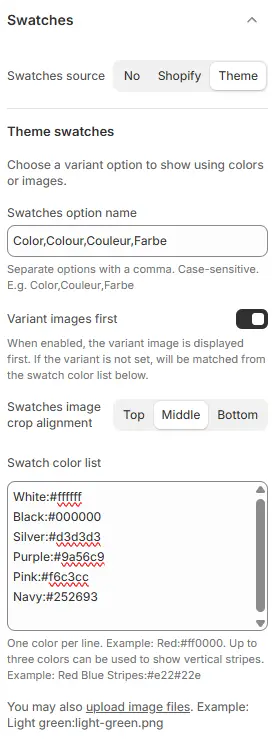
- Swatches source:
No: Use default dropdownsShopify: Use Shopify metafields for color mappingTheme: Use theme-defined swatches below
🎯 Theme Swatches
- Swatches option name: Enter the variant option name (e.g.,
Color,Colour,Couleur) - Variant images first: Prioritize variant images over color swatches
- Swatches image crop alignment: Choose
Top,Middle, orBottomfor image cropping - Swatch color list: One color per line in format
Name:#hex
Example:White:#ffffff
Black:#000000
Silver:#d3d3d3
Purple:#9a56c9
Pink:#f6c3cc
Navy:#252693
Orange:#f08f35
Green:#4ca74c
Red:#e33b30
Blue:#205dcc
Gold:#cc9c36
Rose gold:#ad727a
Brown:#915938
Gray:#808080
Beige:#e7d8b0
Bronze:#c38242
Teal:#0ca678
⚙️ 13. Advanced
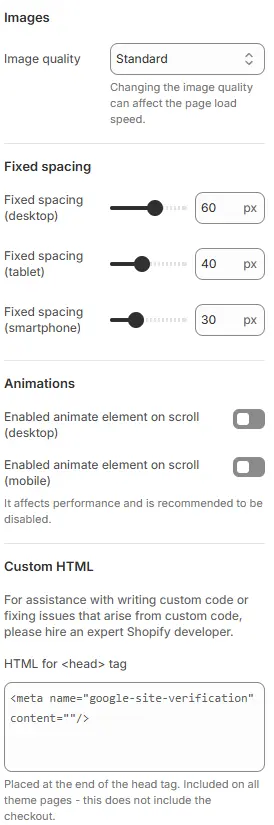
- Images - Image quality: Choose
Standard,Higher, orHighest(note: higher = slower load) - Fixed Spacing (Responsive): These values likely control padding between major content blocks (e.g., sections, collections, banners) for responsive layouts.
- Animations - Enabled animate element on scroll: Activates AOS (Animate On Scroll) for section/block animations
- Custom HTML - HTML for
<head>tag: Add meta tags, verification codes, or scripts
Example:<meta name="google-site-verification" content="your-code-here" />⚠️ Warning: Custom code can break your store. For help, hire a Shopify Expert.
🎨 12. Custom CSS
Add global CSS rules that apply to your entire store.

✅ Use this to override theme styles, add custom animations, or fine-tune spacing.
📌 Changes here affect all pages—test thoroughly.