Faq Search Bar
A search bar designed for FAQ pages with a large number of questions. It dynamically filters and highlights matching Collapsible Tab blocks as the user types.
⚠️ Requirement: This block only works when placed on a page that contains one or more [Collapsible Tab] blocks (used for FAQ items).
Settings
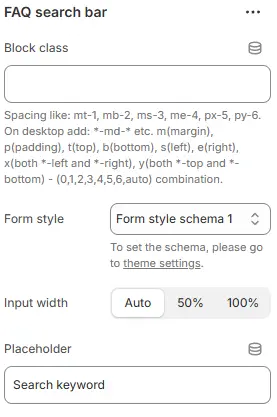
-
Block class: Custom CSS class applied to the block container for additional styling or spacing control.
→ See: Blocks → Overview → General Settings -
Form style (discount code box): Styling for the code display field, using a preset from Theme Settings → Style scheme settings → Form Style Schema.
-
Input width: Controls how wide the search box appears relative to its container.
- Options:
→Auto→ expands to fit content or parent constraints (default behavior)
→50%→ occupies half the available width — good for centered layouts or side-by-side elements
→100%→ full-width input — ideal for mobile-first designs or prominent search bars
- Options:
-
Placeholder: Sets the hint text displayed inside the search field before user input.
Animations on Scroll
- Enable entrance animations as block enter the viewport.
- Configuration follows the standard Animations on Scroll settings.
- See: Blocks → Overview → Animations on scroll