Social Media Icons
A block for displaying social media icons to link to your brand’s profiles. Ideal for footers, headers, or contact sections.
Main Settings
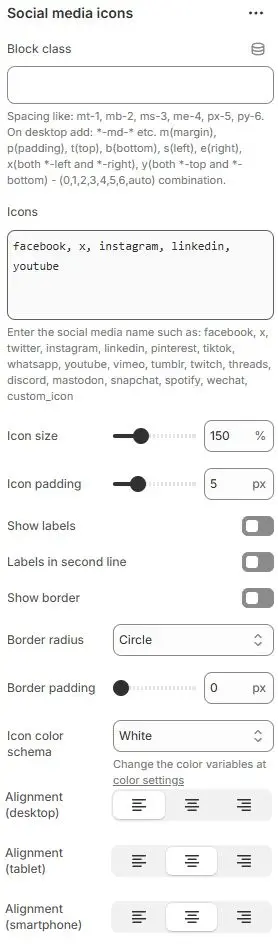
- Block class: Custom CSS class applied to the block container for additional styling or spacing control. Blocks → Overview → General Settings
- Icons: Enter social platform names in lowercase, separated by commas.
Supported icons:facebook, x, twitter, instagram, linkedin, pinterest, tiktok, whatsapp, youtube, vimeo, tumblr, twitch, threads, discord, mastodon, snapchat, spotify, wechat, custom_iconwarningBefore enabling the display icon, please configure the corresponding social media account address in Shopify Theme Editor, Theme Settings ->Social Media.
- Icon size: Size of the social media icons (e.g.,
100%,150%,200%). - Icon padding: Internal spacing around each icon, in pixels (
px). - Show labels: Toggle visibility of the platform name (e.g., “Instagram”) below each icon.
- Labels in second line: Force labels to appear on a new line beneath the icon (instead of inline).
- Show border: Add a visible border around each icon+label group.
- Border radius: Corner roundness of the border (e.g.,
Rounded 1–5,Pill,Circle). - Border padding: Spacing between the border and inner content (icon + label), in
px. - Icon color schema: Choose icon color from your theme’s predefined color variables.
→ Defined in Theme Settings > Basic Settings > Colors - Alignment (desktop): Horizontal alignment on desktop (left, center, right).
- Alignment (tablet): Horizontal alignment on tablet devices.
- Alignment (smartphone): Horizontal alignment on smartphone devices.
Animations on Scroll
- Enable entrance animations as block enter the viewport.
- Configuration follows the standard Animations on Scroll settings.
- See: Blocks → Overview → Animations on scroll