Custom Liquid Block
The Custom Liquid Block allows you to embed raw Liquid code directly into any section of your store. This is useful for advanced customizations, dynamic content, or integrating third-party snippets that require server-side rendering.
⚠️ Warning:
- Incorrect Liquid syntax can break your store’s layout or functionality.
- Always test changes on a draft theme before publishing.
- For complex logic or performance-critical features, consider hiring a Shopify Expert.
Settings
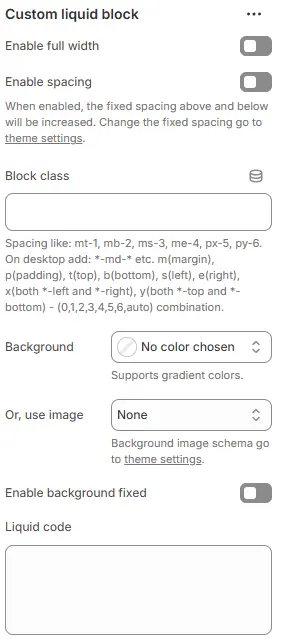
- Enable full width: Expand the block to 100% of the viewport width.
- Enable spacing: Adds fixed vertical margin above and below the block when enabled.
- Blog class: Custom CSS class for spacing or layout overrides.
- Background: Set a solid or gradient background color.
- Or, use image: Apply a background image using a preset from Theme Settings → Style scheme settings → Background Image Schema.
- Enable background fixed: Fixes background image during scroll (parallax effect).
All settings above follow: Blocks → Overview → General Settings
- Liquid code: Enter your custom Liquid, HTML, or JavaScript code.
✅ Supported: Shopify objects (
product,collection,cart), filters, tags, and theme-specific variables.
❌ Not supported: Server-side includes that modify core theme files (use Edit code for those).