Featured Products
Recommended Products block settings
Settings
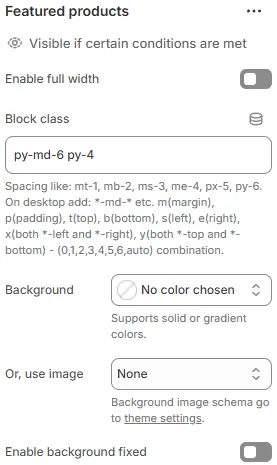
- Enable full width: Expand the block to 100% of the viewport width.
- Block class: Custom CSS class for spacing or layout customization.
- Background: Set a solid or gradient background color.
- Or, use image: Apply a background image using a preset from Theme Settings → Style scheme settings → Background Image Schema.
- Enable background fixed: Fixes background image during scroll (parallax effect).
All settings above follow: Blocks → Overview → General Settings
Heading
Used to set the top heading of the block.
For detailed parameters, refer to: Blocks → Basic Block → Heading
Description
Appears below the heading and supports rich text content (e.g., descriptions, calls to action).
For configuration options, refer to: Blocks → Basic Block → Text
Child block
Slide or Grid
Setting reference: Blocks → Specific Block → Slide or Grid
Product cards
Setting reference: Blocks → Specific Block → Slide or Grid → Slide - products