Featured Collection
The Featured Collection block displays products from a selected collection or custom product list using a Swiper-powered carousel with advanced transition effects. Ideal for highlighting seasonal collections, bestsellers, or new arrivals.
Settings
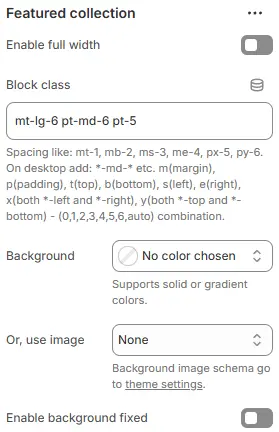
- Enable full width: Expand the block to 100% of the viewport width.
- Enable spacing: Adds fixed vertical spacing (margin) above and below the FAQ block.
- Blog class: Custom CSS class for spacing or layout overrides.
- Background: Set a solid or gradient background color.
- Or, use image: Apply a background image using a preset from Theme Settings → Style scheme settings → Background Image Schema.
- Enable background fixed: Fixes the background image during scroll (parallax effect).
All settings above follow: Blocks → Overview → General Settings
Heading
The setting for Heading is the same as that for [Heading] block, please refer to the following settings: Blocks → Basic Block → Heading.
Rich text
The setting for Rich text is the same as that for [Text] block, please refer to the following settings: Blocks → Basic Block → Text.
Child Blocks
Slide or Grid: Static fixed block, supporting carousel or grid layout.
Slide or Grid
Reference settings: Blocks → Specific Block → Slide or Grid.
Slide - products
Reference settings: Blocks → Specific Block → Slide or Grid → Slide - products.
Product cards
Reference settings: Blocks → Specific Block → Product Cards.