Image With Text
The Image With Text block combines a media image with descriptive content (heading, text, and button) in a flexible layout. Ideal for feature highlights, promotional banners, or storytelling sections.
Settings
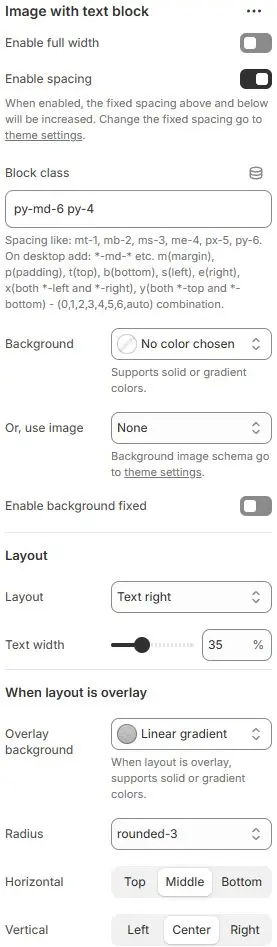
- Enable full width: Expand the block to 100% of the viewport width.
- Enable spacing: Adds fixed vertical spacing (margin) above and below the FAQ block.
- Block class: Custom CSS class for spacing or layout overrides.
- Background: Set a solid or gradient background color.
- Or, use image: Apply a background image using a preset from Theme Settings → Style scheme settings → Background Image Schema.
- Enable background fixed: Fixes the background image during scroll (parallax effect).
All settings above follow: Blocks → Overview → General Settings
Layout
- Layout: Choose content arrangement:
Text left: Text on the left, image on the rightText right: Text on the right, image on the leftText overlay image: Text floats directly over the image
- Text width: Width of the text column as a percentage of the container (e.g.,
45%).
When layout is overlay
- Overlay background: Background color/gradient behind overlaid text.
- Radius: Corner rounding for the overlay/text container.
- Horizontal Alignment: Positions text horizontally within overlay.
- Vertical Alignment: Positions text vertically within overlay.
Child Blocks
Image
Mainly set static blocks for images. Settings follow Blocks → Basic Block → Image.
Other blocks that can be freely added or removed are as follows:
