Newsletter
The Newsletter block collects email subscriptions from visitors. It’s a key tool for building your marketing list and driving repeat traffic through email campaigns.
Settings
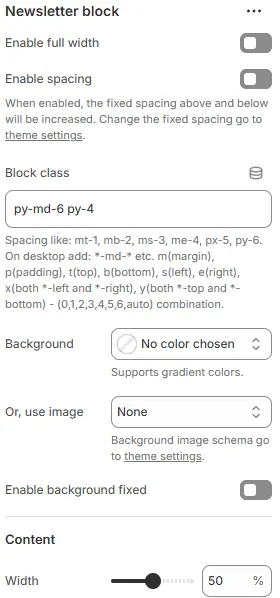
- Enable full width: Expand the block to 100% of the viewport width.
- Enable spacing: Adds fixed vertical spacing (margin) above and below the FAQ block.
- Block class: Custom CSS class for spacing or layout overrides.
- Background: Set a solid or gradient background color.
- Or, use image: Apply a background image using a preset from Theme Settings → Style scheme settings → Background Image Schema.
- Enable background fixed: Fixes the background image during scroll (parallax effect).
All settings above follow: Blocks → Overview → General Settings Content
- Width: Width of the content container as a percentage (e.g.,
100%,80%equivalent via responsive scaling).
Child Blocks
Heading
Section title (e.g., “Join Our Newsletter”). Settings follow Blocks → Basic Block → Heading.
Text
Supporting description (e.g., “Get early access to sales and new arrivals”). Settings follow Blocks → Basic Block → Text.
Newsletter form
Email input field with submit button. Settings follow Blocks → Basic Block → Newsletter Form.