Rich Text
The Rich Text block provides a flexible container for combining a heading and rich-text content. It’s ideal for informational sections, policy summaries, storytelling, or any content that doesn’t require interactive elements like forms or product data.
Settings
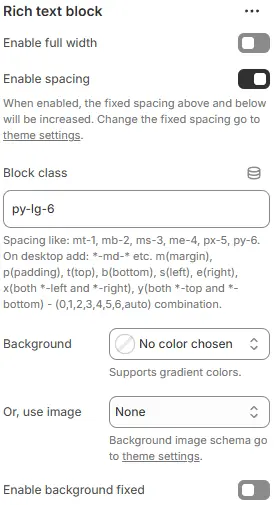
- Enable full width: Expand the block to 100% of the viewport width.
- Enable spacing: Adds fixed vertical spacing (margin) above and below the FAQ block.
- Block class: Custom CSS class for spacing or layout overrides.
- Background: Set a solid or gradient background color.
- Or, use image: Apply a background image using a preset from Theme Settings → Style scheme settings → Background Image Schema.
- Enable background fixed: Fixes the background image during scroll (parallax effect).
All settings above follow: Blocks → Overview → General Settings
Child Blocks
Heading
Section title (e.g., “Our Story”, “Shipping Policy”). Settings follow Blocks → Basic Block → Heading.
Text
Main content area with full rich-text editing (paragraphs, lists, links, bold/italic, etc.). Settings follow Blocks → Basic Block → Text.
Cloumn
Cloumn layoyt content. Settings follow Blocks → Specific Block → Column.